


Decor Matters: Home Design App
2.922.00 Reviews
App Specs
- Version
- 1.5.2
- Updated On
- License
- Free
- Downloads
- 50,000+
- Developer
- DecorMatters, Inc.
- Categories
- House & Home
- Platform
- Android
Screenshots

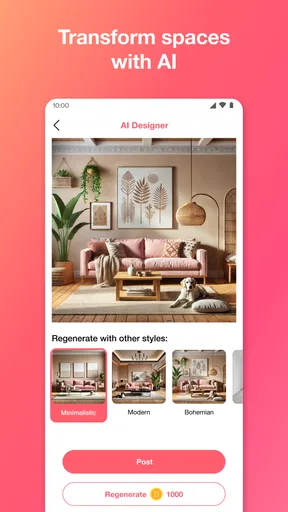
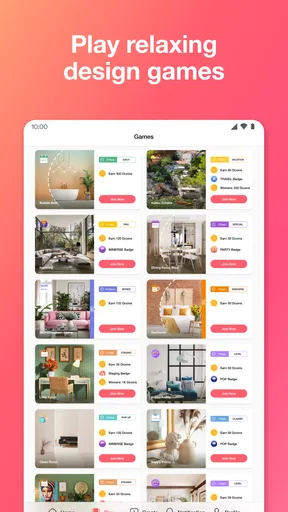
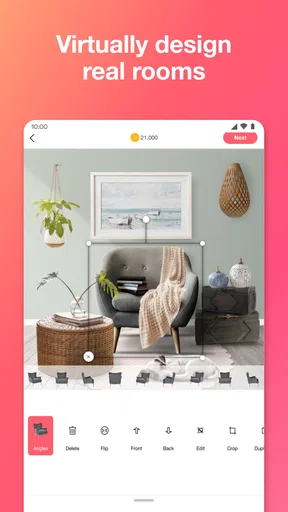
 Analysis by AppCompare
When I’m unsure whether a room needs a different layout or just one better-sized piece, I like to explore ideas before moving furniture around. Decor Matters gives that kind of experimenting a playful home: I can look at other people’s designs, try furniture and décor in a photo of my own space, and learn as I go. It’s a more hands-on option than simply collecting inspiration images, though I’d treat a digital mock-up as a planning aid rather than a guarantee of how a room will feel in person.
A useful first pass before you redecorate
My most practical approach is to begin with one specific question: would a larger sofa crowd the walkway, or would a lighter accent color make the room feel less heavy? Starting with a decision like that keeps browsing from turning into aimless scrolling. I look for ideas that solve the same problem, then use a photo of my room to see whether a direction seems promising.
That distinction matters because inspiration and planning are not quite the same thing. A polished room in someone else’s design can spark an idea, but it may have different proportions, lighting, or furniture than mine. I get more value when I borrow one element—such as a color pairing or a general arrangement—and test it against my own space instead of trying to reproduce the whole look.
Make the preview useful, not final
Trying products in a room photo is the feature I’d use before shopping, especially when I’m comparing broad styles. It can help me decide whether I’m drawn to a clean, modern look or something warmer and more layered. I wouldn’t use a screen preview alone to judge exact dimensions, materials, or how a finish changes under my home’s lighting; those are the details I’d check separately before spending money.
A simple habit makes the process more informative: change one major choice at a time. If I swap the sofa, rug, and wall décor all at once, it’s hard to tell which change improved the room. Testing a sofa first, then considering supporting pieces, gives me a clearer sense of what is doing the work and helps prevent a nice-looking arrangement from becoming an impractical shopping list.
Who will get the most from it
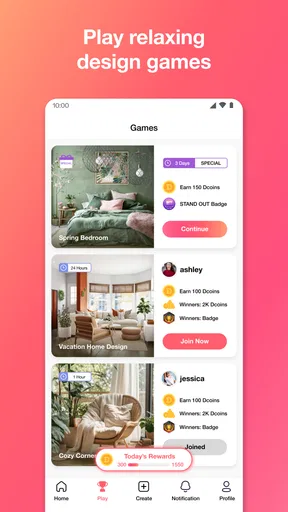
I see the strongest fit for curious beginners, renters planning a refresh, and anyone who enjoys arranging rooms for fun before committing to a real change. The community and design challenges give the app a creative side beyond product browsing, so it can also suit people who like sharing ideas and seeing how others interpret a brief. DecorMatters, Inc. makes this free House & Home app, which is rated for Everyone; it has an average rating of 2.9 from 144 ratings and more than 50,000 installs.
I’d be more cautious if I needed a precise floor plan, dependable measurements, or professional-grade renovation documentation. A dedicated room-planning tool is a better choice for those jobs. This app’s appeal is the quick visual experiment and the mix of inspiration with social creativity, not replacing a measured plan or a visit to a furniture showroom.
Worth Reading Before You Choose

EA SPORTS FC Mobile 26 Is a Bigger Football Game, but It Takes Time

Flipboard Shows What News Apps Must Do Beyond the Feed

Switching to Android Auto Means Rethinking Your Driving Routine

Google Calendar Makes a Crowded Week Easier to Manage

Ludo King Makes the Most of the Minutes Between Plans

Baby Panda World Brings Quick Play to Modern Phones, but Its Game Library Feels Busy
Cost, version, and a sensible way to try it
The app is free to install, but it includes optional in-app purchases ranging from $0.99 to $79.99 per item. I’d explore the free experience first and pause before buying anything: decide what you want to accomplish, see whether the available tools support that task, and only then consider whether an optional purchase is worth it to you. That is especially sensible if you’re mainly curious and don’t yet know whether you’ll use the app regularly.
It was released on August 15, 2024, and the current version is 1.5.2, with Android 9 as the minimum operating system. Those details make it easier to check basic compatibility before installing, but the more important question is whether you want a creative design space or a technical measuring tool. I’d choose based on that difference rather than expecting a playful room-design app to do every part of a real renovation.
Getting Started with Decor Matters
So, I downloaded Decor Matters on my phone, and right from the get-go, I could tell it was going to be a fun ride. The app is super intuitive, with a clean interface that makes it easy to navigate. I mean, who has time to fiddle around with complicated menus, right?
Dive into the World of Home Design
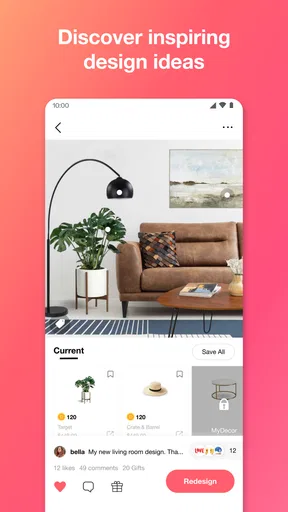
Once you’re in, you can start by exploring a variety of design inspirations that suit every taste. Whether you're into modern minimalism or cozy countryside vibes, there’s something for everyone. It’s like Pinterest but with a focus on real-life application, which I find really cool. Plus, you can browse a ton of user-generated content, which adds a fresh perspective to the mix.
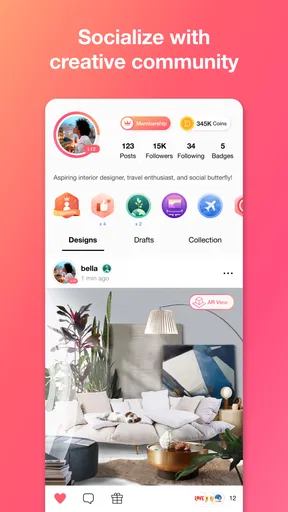
The community aspect is what sets this app apart. You can connect with other design enthusiasts, share your creations, and even get feedback. It’s like Instagram but for home design geeks. I found myself scrolling through endless creative ideas, and it was like a rabbit hole I happily got lost in!
Design Like a Pro
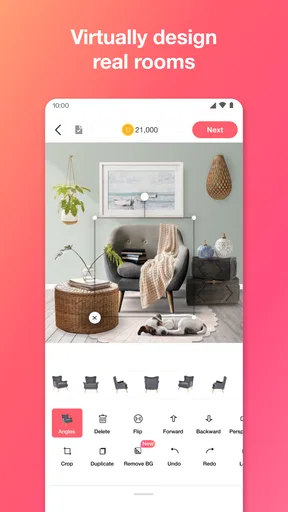
Now, the real magic happens when you start designing. You can upload a photo of your own space and use the app’s tools to try out different furniture and decor items. It’s all drag-and-drop, so even if you’re not tech-savvy, you’ll catch on fast. I had a blast imagining how my room could look with a sleek leather sofa and some funky wall art. The best part? No heavy lifting required.
The app offers a variety of furniture and decor options from real brands. So if you find something you love, you can actually purchase it directly through the app. It’s a seamless integration that saves you the hassle of hunting down the perfect piece online.
Learning and Growing
Another feature I found incredibly helpful is the educational content. Decor Matters doesn’t just let you play around with ideas; it helps you learn the principles of design. There are tutorials and tips that teach you about color theory, furniture arrangement, and other design fundamentals. It’s like having a crash course in interior design, and trust me, your home will thank you for it.
I also love the challenges and contests within the app. They’re a great way to push your creativity to the next level. Plus, who doesn’t love a bit of friendly competition? It’s a fun way to test your skills and see how you stack up against other design lovers.
Choosing a repeatable workflow
For a practical session, I’d keep the steps small: browse for a clear idea, pick one room photo, make a single meaningful change, and save or share the result if it helps me think it through. That repeatable loop is more useful than treating every session as a full-room makeover. It also makes it easier to return later and remember what I was trying to solve, instead of getting distracted by a completely different style halfway through.
If I’m comparing options with another person in the household, I’d use the design as a conversation starter rather than a final vote. A visual can make preferences easier to explain—“more open,” “less busy,” or “warmer”—but everyone should still check real dimensions and comfort before buying. The app can help narrow a choice; it cannot sit on the sofa or tell us whether a walkway feels cramped.
Settings and habits worth checking
Experienced use doesn’t depend on secret controls; it comes from being deliberate with the tools that are visible. I’d check the app’s available settings when I first install it, particularly anything that affects how I browse, share, or manage purchases, and adjust them to match how I want to use the app. I’d also make sure I’m comfortable with the image I choose to work on before sharing a design publicly. That small pause helps keep a casual room experiment separate from anything I’d rather keep private.
When testing a room, I’d use a clear photo with the area I want to change easy to see, then avoid judging tiny placement differences as if they were measured plans. A photo is a useful visual reference, but perspective can make furniture appear larger or smaller than it is. My rule is to use the preview to answer “does this direction appeal to me?” and use actual product dimensions and an in-room check to answer “will this fit?” That division makes the app more helpful and reduces the chance of mistaking a convincing image for a precise result.
Where social discovery helps—and where it distracts
Community browsing is especially useful when I’m short on ideas or want to see how other people combine colors and furnishings. I’d save my attention by looking for a particular mood or room problem instead of endlessly comparing finished designs. Other users’ work can expand my sense of what’s possible, but popular-looking ideas are not automatically right for my home, budget, or routines. The best inspiration is the part I can adapt, not necessarily the whole scene.
There is a trade-off here: the social and challenge elements make the experience lively, but they can pull focus away from a practical task. If I only have a few minutes to make a decision, I’d go straight to my room photo rather than start with the community feed. If I’m in a playful mood, browsing and sharing are part of the appeal. Knowing which kind of session I want helps me avoid confusing entertainment with progress on a real decorating decision.
How it compares with familiar alternatives
Compared with Pinterest or a standard image board, this app brings the idea closer to the room by letting me work with a photo of my own space and try décor in context. That makes it more useful for imagining a change than a collection of saved pictures, while a general social platform may offer a broader range of unrelated inspiration. Compared with dedicated room-planning software, though, its approachable, playful style is not the same as a precise technical workflow. I’d use it for visual exploration and use a measuring or planning tool when exact layout decisions matter.
It also sits between browsing products and making a design. Seeing real-brand furniture and décor can connect inspiration with shopping, which is convenient when I’m ready to investigate an item. But a product appearing in a visual arrangement doesn’t settle whether its size, finish, delivery, or price suits my situation. I’d treat the in-app shopping path as a starting point for checking a piece, not as a reason to skip ordinary comparison and measurement.
A realistic room-refresh routine
Imagine I have a free evening and want to brighten a living room without buying anything on impulse. I’d take a clear photo, browse a handful of designs for one direction—perhaps lighter colors—and try a few décor changes around the existing layout. Then I’d stop and ask what actually improved the room: the palette, the placement, or one potential new item. If the answer is unclear, I’d leave the design alone and revisit it later rather than adding more pieces just to make the image feel finished.
The next day, I could compare the promising idea with the room in daylight and check the dimensions of any product I’m considering. That pause is a useful counterweight to the app’s instant visual feedback. It turns a fun experiment into a more grounded decision, and it costs nothing to decide that the best result is simply keeping the room as it is.
Limits to keep in mind before committing
The app’s average rating is 2.9, so I wouldn’t assume every person will find the experience equally smooth or useful. That figure is one reason I’d start with a modest goal and see how the app behaves on my own device before building a large project around it. It is free to try, but optional purchases make it worth staying aware of what I’m choosing to spend; the creative appeal does not mean every paid option will be necessary for my needs.
For a decorator who wants exact plans, a reliable materials list, or a complete renovation workflow, I’d look elsewhere first. For someone who mainly wants to picture a new look, learn a few design principles, and enjoy a creative community, the compromises may be easier to accept. My advice is to judge it by the quality of the ideas it helps you explore, not by whether it can replace every specialist tool or professional step.
Learning by making small choices
The educational side makes more sense to me when I apply one concept at a time. If a tutorial discusses color, I can test a limited palette in a room image; if I’m thinking about arrangement, I can focus on how a major piece relates to the space around it. That gives the learning a practical anchor instead of turning it into advice I read and immediately forget. I would still treat the app’s lessons as a starting point, since real rooms have constraints that a design exercise may not capture.
Challenges can be a good prompt when I’m stuck, because a brief gives me a reason to make something rather than wait for inspiration. I’d approach them as practice, not as a measure of whether I have good taste. Comparing my choices with other users can reveal alternatives, but the useful question is what I learned from the comparison—not whether my room would win a contest.
My verdict after looking at the whole experience
All in all, Decor Matters is a must-have app for anyone looking to spruce up their space. Whether you’re a seasoned designer or just starting out, it offers something for everyone. The blend of creativity, community, and commerce makes it an engaging and practical tool for home design enthusiasts.
So, if you’re ready to transform your living space and unleash your inner designer, give Decor Matters a try. Who knows? You might just discover a new passion or, at the very least, end up with the living room of your dreams. Happy decorating!
Pros
- User-friendly interface for easy navigation.
- Wide range of decor items to choose from.
- Regular updates with new design challenges.
- Interactive community for sharing ideas.
- Realistic 3D visuals enhance design experience.
Cons
- In-app purchases can be expensive.
- Requires a stable internet connection.
- Limited features in free version.
- Occasional bugs in design tools.
- Some items take time to unlock.
FAQs for Decor Matters: Home Design App
What features does Decor Matters offer for home design?
Decor Matters provides a wide array of features, including an augmented reality tool to visualize designs in your space, a vast library of furniture and decor items, and a community platform to share and discover design ideas. Users can also participate in design challenges and gain inspiration from professional designers.
Is Decor Matters free to use or does it require a subscription?
Decor Matters offers a free version with basic features. However, for access to premium content, additional design tools, and an ad-free experience, users can opt for a subscription. The app frequently updates its library and tools, ensuring a wide array of options for both free and paid users.
How user-friendly is Decor Matters for beginners?
Decor Matters is designed with user-friendliness in mind, making it accessible for beginners. The intuitive interface, step-by-step tutorials, and community support help users navigate the app easily. Even those with no prior design experience can create stunning layouts and gain insights from the app's resources.
Can I use Decor Matters offline, or do I need an internet connection?
Some features of Decor Matters, such as the augmented reality tool and community interaction, require an internet connection. However, users can save and work on their designs offline, accessing them once they reconnect. Regular updates and internet access ensure the best experience and resource availability.
How does Decor Matters ensure the accuracy of its augmented reality feature?
Decor Matters uses advanced AR technology to deliver accurate representations of furniture and decor in real spaces. The app continuously updates its AR algorithms and collaborates with professional designers to refine the accuracy. Users are encouraged to provide feedback to help improve this feature further.


